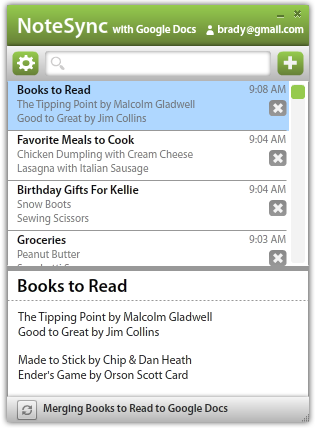

Taking notes has never been this fast. Actually find the notes you took two weeks ago. Did we mention your notes sync with Google Docs? Yeah, we thought of that too. Experience NoteSync by downloading NoteSync for free today.
Features, gotta have 'em
Take notes fast
Turn thoughts into notes without being limited by software.
Sync notes with Google Docs
Notes sync every minute
or when you feel like it.
Search notes fast
Every keystroke searches for the note you are looking for.
Security
Secure HTTPS transmission.
Encrypted local file storage.
Keyboard shortcuts
Intuitive shortcuts make key tasks as easy as the press of a button.
Everywhere you go
Your notes are everywhere you are.
Mobile coming soon.
NoteSync Desktop
NoteSync lets you take notes fast and sync them with your Google Docs account. Keyboard shortcuts like CTR-L put your cursor in the search bar to easily search for notes or create a new note. Automatic syncing happens every minute or when you feel like it by pressing the sync button. Offline mode fully supported. Try NoteSync today!
NoteSync Android
NoteSync Android has been released! Get it at the Android Market for $0.99! Our most requested feature is getting NoteSync notes on your phone, so we listened.
Desktop Release Notes
When a new release is pushed, NoteSync will automatically notify you when you launch NoteSync. To upgrade manually, simply click "install now" above and NoteSync will be updated to the latest version.
1.1.1 Release Notes - Aug 28, 2011
We are no longer using Adobe InMarket as our licensing solution. This update removes license checking through Adobe. Please stay tuned for future updates.
- Version displayed correctly in settings
- Migrated licensing off of Adobe InMarket
1.1 Release Notes - Dec 30, 2010
- Window Size and Position including divider bar saved persistently
- Change Font Size, default now 14
- Updater no longer prompts user daily
- Tab now tabs note contents
- Blank new note now highlights title
- Fixed pause after startup
- Application Drop Shadow Added
- Note list scrollbar only is visible when it needs to be
- Added Maximize Button
- Fixed Always On Top bug with license checking
- Selected text span(s) now tab when tab key is pressed, shift-tab also enabled
- Better Analytics Library
- Pressing enter while in title sets focus on note content
- Pressing Enter while in Delete Note dialog deletes note
- Pressing Escape while in Delete Note dialog cancels dialog
- Now accepts a command line argument as a default search term
Official 1.0 Release Notes - Aug 31, 2010
- Minor bug fixes.
- Beta testing finished, stable.
- Software licensing through Adobe.
Beta 1.2.1 Release Notes - July 22, 2010
- "New Style" documents now supported. These caused many sync incomplete issues.
Beta 1.2 Release Notes - June 30, 2010
- Rename Note Titles
- Fixed sync errors where note titles had &, <, > HTML entities in them
- Create new notes without a note title in search bar
- Better tabbing - now tab between searchbar, note title, and note contents only.
- Skinning improvements.
- Better Anonymous Usage Reporting
- Mac users no longer have characters added to notes when using command key shortcuts (must update to AIR 2.0)
Beta 1.1.1 Release Notes - May 10, 2010
- Google Apps Accounts Supported
Beta 1.1.0 Release Notes - May 5, 2010
- Collapsing Window to TitleBar
- Minimize to Tray
- Always on Top
- Code Signing Certificate - no longer publisher "unknown"
- CTR-L Clears search and places cursor in search bar
- CTR-S Starts Sync
- Delete Note Prompt
- Recent local changes are not overwritten by a sync.
- Two Default Notes don't keep coming back.
- Notes sent to trash on Google Docs instead of permanently deleted on sync.
- "Starting Sync..." hang fixed. Cause: Duplicate 'NoteSync' folders or a document exactly titled 'NoteSync'.
- If 'NoteSync' folder trashed -- better logic, doesn't hang.
- Fixed Login Button Hit Area & Added Rollover
- Minimum Width & Minimum Height enforced
- Sync Complete message now shows time
- Settings button, removed left & right arrows
- Sort by Alphabetical or Date Modified
- Anonymous error reporting and usage statistics
- Mac users can now use Command instead of Control for keyboard shortcuts
- Creating a new note clears the search bar showing all notes
This list is a result from all the great feedback we have received. The following are features and fixes we are currently working on for upcoming releases.
Future Releases
- Bold / Italics
- Support for 1000+ notes
- Clickable links in note body
- Tagging
- Command-N brings up NoteSync from anywhere
Suggest a feature that isn't on this list? Check to see if it's on User Voice to make sure we know about it.
Get On Our Mailing List
Get on our mailing list to be notified when new releases are ready.


Follow NoteSync